AI-Powered Real Estate Lead Qualification & CRM Automation
Context
A real estate business collects buyer inquiries through a Tally form, but every lead needed to be manually read, judged for urgency and fit, entered into HubSpot, and routed to the right agent. I built an automation that does all of that within seconds of submission — with AI handling the qualification a human would otherwise do by hand.
The Problem
Real estate agencies and small sales teams get inbound leads through a web form but don't have someone dedicated to triaging and entering them into a CRM in real time. Leads get read minutes or hours after submission, urgency is judged inconsistently, and there's no reliable record of which leads came in, which were missed, or why. The cost is invisible but real: slow follow-up, misrouted leads, and no audit trail.
Objectives
- —Qualify every inbound lead within seconds of form submission.
- —Score urgency, priority, and buyer fit consistently — not case by case.
- —Sync qualified leads to the CRM with AI-derived fields as structured properties.
- —Notify the right agent in Slack without anyone opening HubSpot.
Approach
I automated the full path from form submission to CRM-ready, agent-notified lead — including the qualification judgment itself. Google Gemini scores urgency, priority, and buyer profile the way an experienced SDR would, and the results are written back to HubSpot as structured custom properties. I deliberately did not automate the follow-up call or the sales conversation. This system prepares the lead and gets it to a human fast — the human relationship still closes the deal.
The Manual Process Before
Every lead followed the same slow path through a team member's inbox — read, judged, entered by hand, and often lost in the shuffle.
- 01Check the inbox or form notifications for new submissions
- 02Read through each lead manually to judge urgency, budget fit, and buyer intent
- 03Manually create or update the contact in HubSpot, typing in notes by hand
- 04Message the relevant agent directly (or forget to, when busy)
- 05Keep no consistent record of which leads came in or which were missed
What Was Built
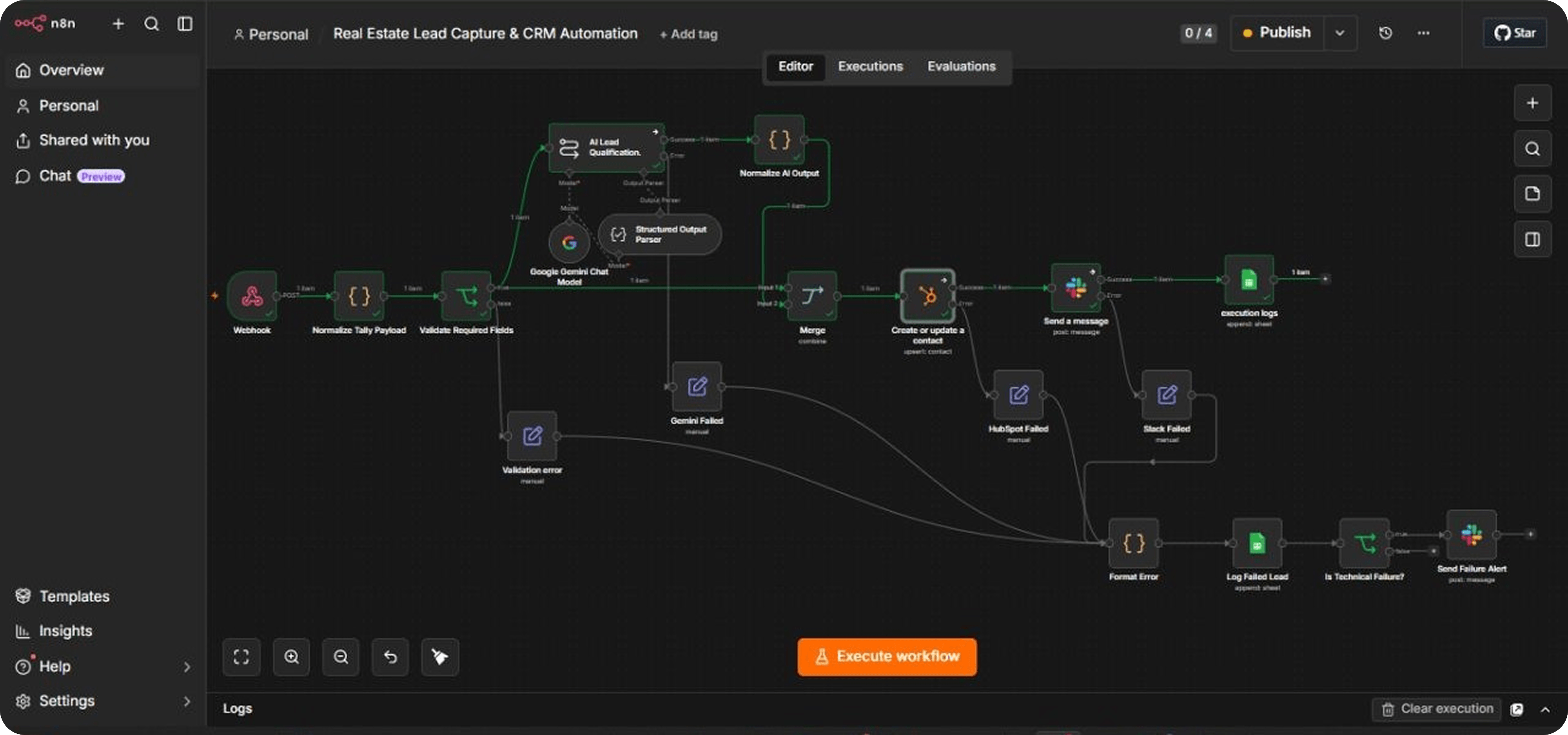
A single n8n workflow takes the Tally submission from raw form data to a qualified, CRM-synced, agent-notified lead — with every outcome logged and every failure handled.
Full Pipeline
The workflow runs from intake through validation, AI qualification, CRM sync, agent notification, and logging. Every branch — including failures — converges on a single audit trail.
The Agent's View
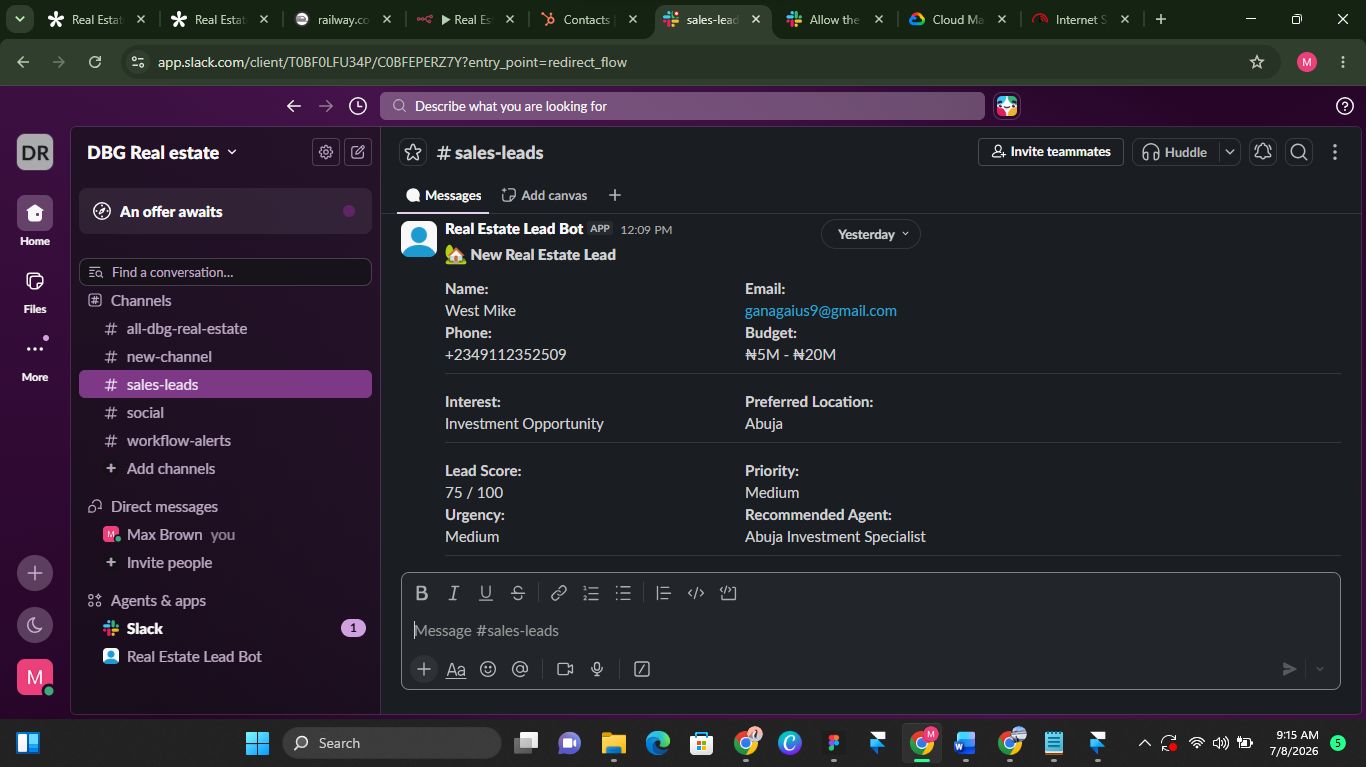
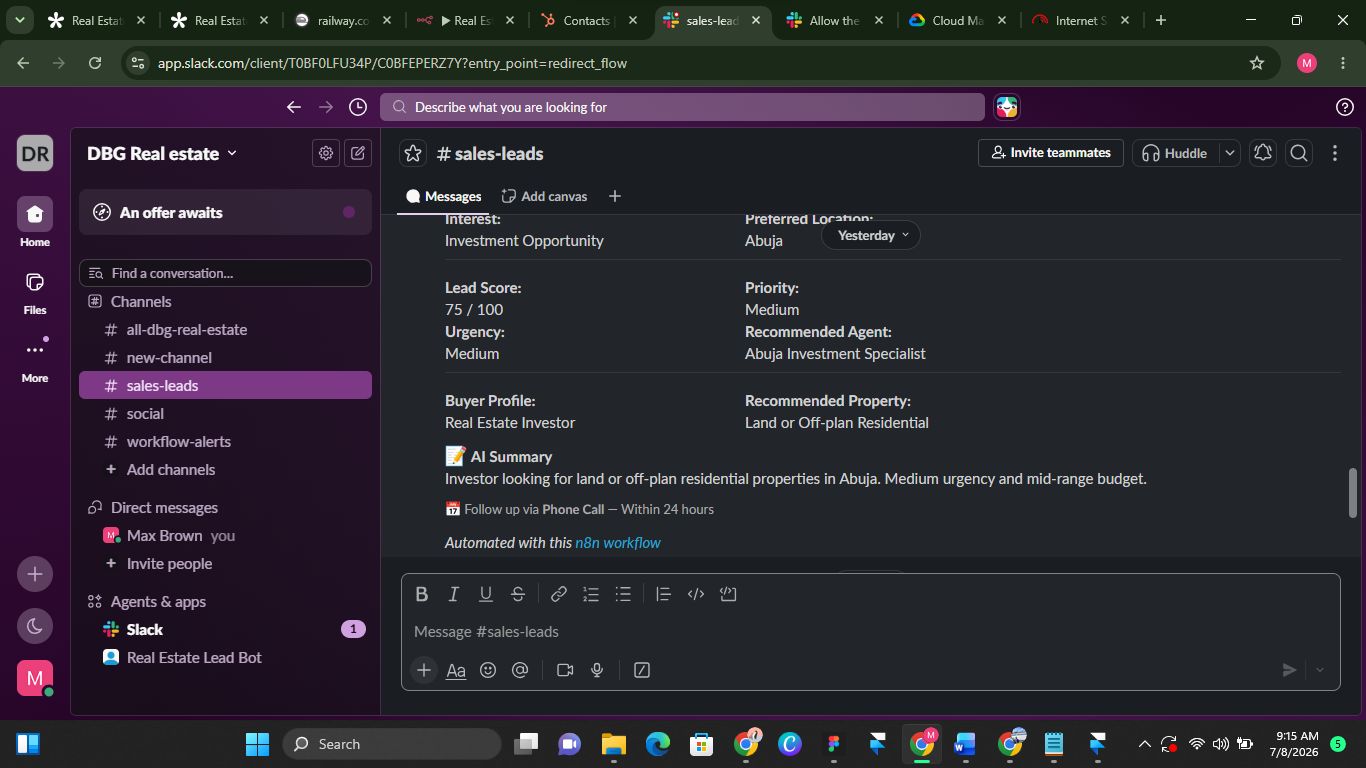
Agents receive a formatted Slack notification the moment a lead qualifies — score, priority, urgency, buyer profile, recommended property, and an AI summary in one glance. No CRM login required to act.
Architecture
Five stages, each with its own failure path. Nothing is allowed to silently drop.
Key Decisions
Derive budget tier from the form answer, not AI guesswork
The AI initially free-text-guessed a budget category and silently defaulted to the lowest tier on any mismatch — misclassifying most leads. Since the lead already selects budget from a fixed dropdown, there was no reason to ask AI to re-interpret it.
Separate technical failures from validation failures
A missing form field isn't a system problem, so those are logged but don't page anyone. A failed API call is, and does. Alerting on both would have caused alert fatigue within days.
Reconstruct lead identity from the earliest reliable node during failures
n8n's error output doesn't reliably carry upstream data forward, so the error-logging path pulls name, email, and phone directly from the normalization step rather than trusting the failed item to still have it.
Error Handling
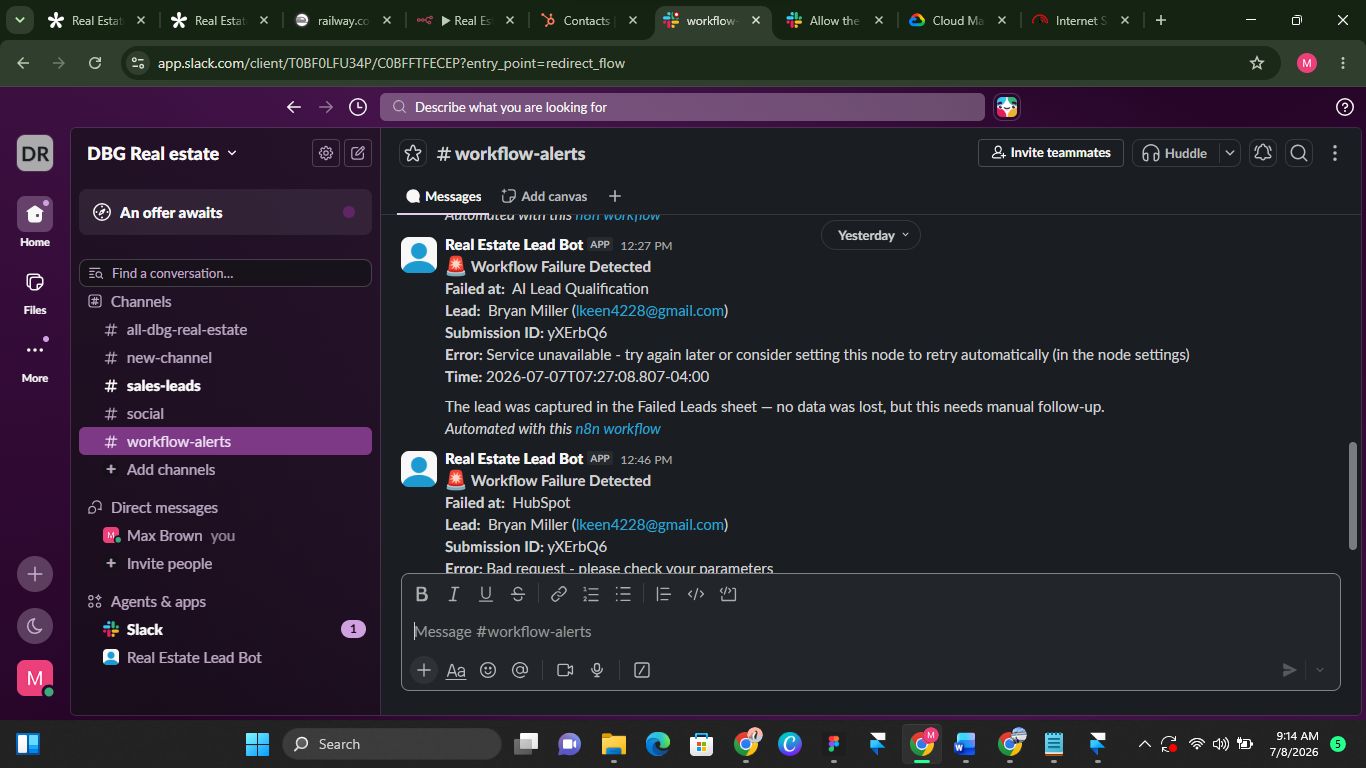
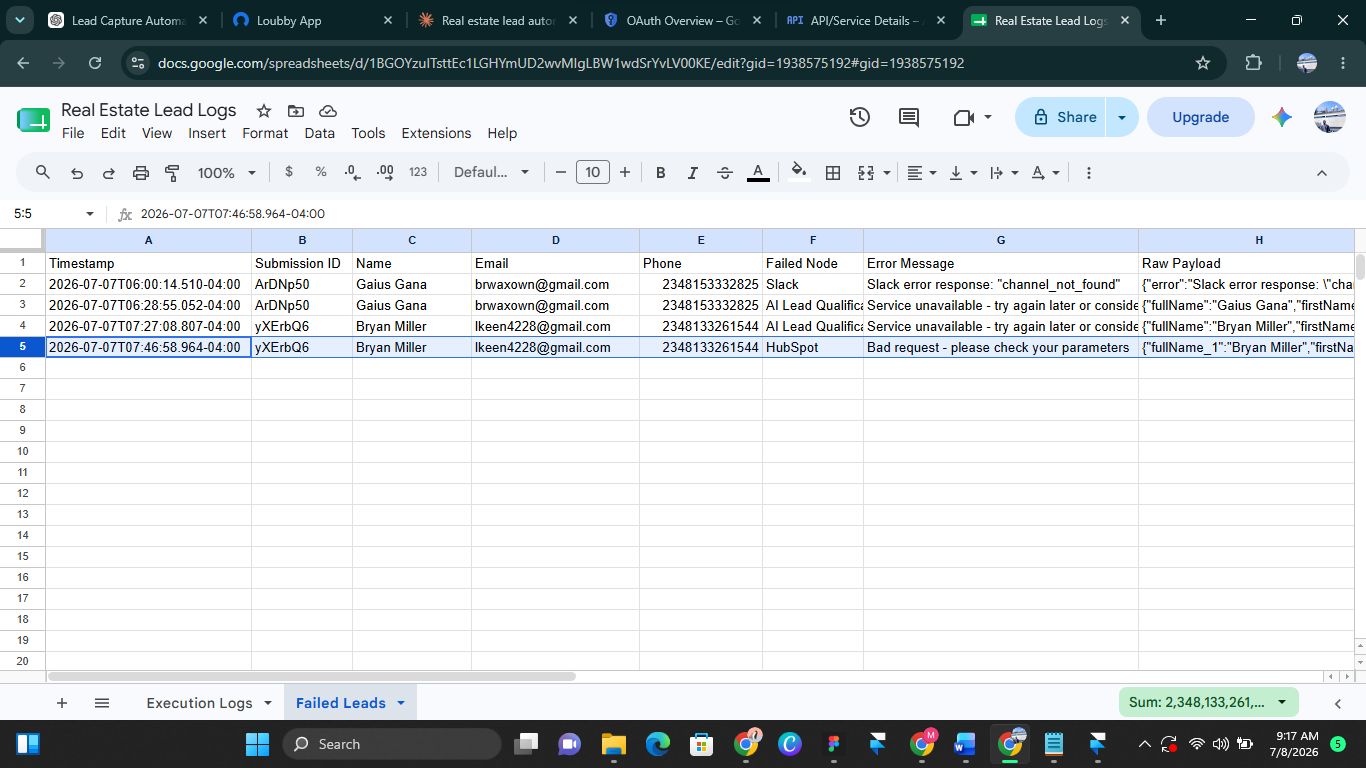
Every integration point has an explicit failure path. When something breaks, the lead is preserved, tagged with exactly what failed, and the team is alerted in a dedicated channel — not the sales channel.
- —AI qualification fails or times out — routed to a dedicated error branch, tagged AI Lead Qualification, logged with the lead's identity intact, team alerted.
- —HubSpot rejects the contact (bad field, API issue) — tagged HubSpot, logged and alerted, so no lead silently fails to reach the CRM.
- —Slack notification fails (bad channel, auth issue) — tagged Slack, logged and alerted. The lead still exists in HubSpot even if the team wasn't pinged.
- —Missing required form fields — tagged Validation Error, logged for review, but intentionally does not trigger a Slack alert.
Results
The workflow was built and validated end-to-end, including deliberate failure-testing of every integration point (AI, CRM, Slack). It's ready for production traffic. Every run is logged to a Google Sheet with two tabs — successful executions and failed leads — so nothing is invisible.
Outcome
A production-ready automation that removes the manual qualification step entirely and shortens response time from hours to seconds. Leads arrive in the CRM with AI-scored priority, urgency, and buyer profile attached — and every run is auditable. The system is designed to fail safely: even when an API is down, the lead is captured and the team is alerted with full context.