An AI Support System With Deterministic Escalation
Context
A multi-tenant AI customer support platform for B2B SaaS. Customers chat with an assistant grounded strictly in each tenant's own documentation. When the assistant can't safely answer — due to risk signals, missing account context, or low retrieval confidence — it deterministically escalates to a human, managing multi-turn case intake along the way. I built the entire system solo: the RAG pipeline, the guardrails, the escalation state machine, the error observability layer, and the frontend admin console.
The Problem
Most AI support tools optimize for a single behavior: answer the question. But answering isn't the hard part — knowing when not to is. Systems that always answer hallucinate policies. Systems built on autonomous agents — where the LLM decides whether to escalate — are unpredictable and hard to debug at the node level. And multi-turn escalation, where a customer provides information across several messages before a human picks up, is where most RAG demos quietly fall apart.
Objectives
- —Ground every answer strictly in the tenant's own ingested documentation — no outside knowledge, no invented policy.
- —Make escalation decisions deterministic and traceable, not delegated to an LLM.
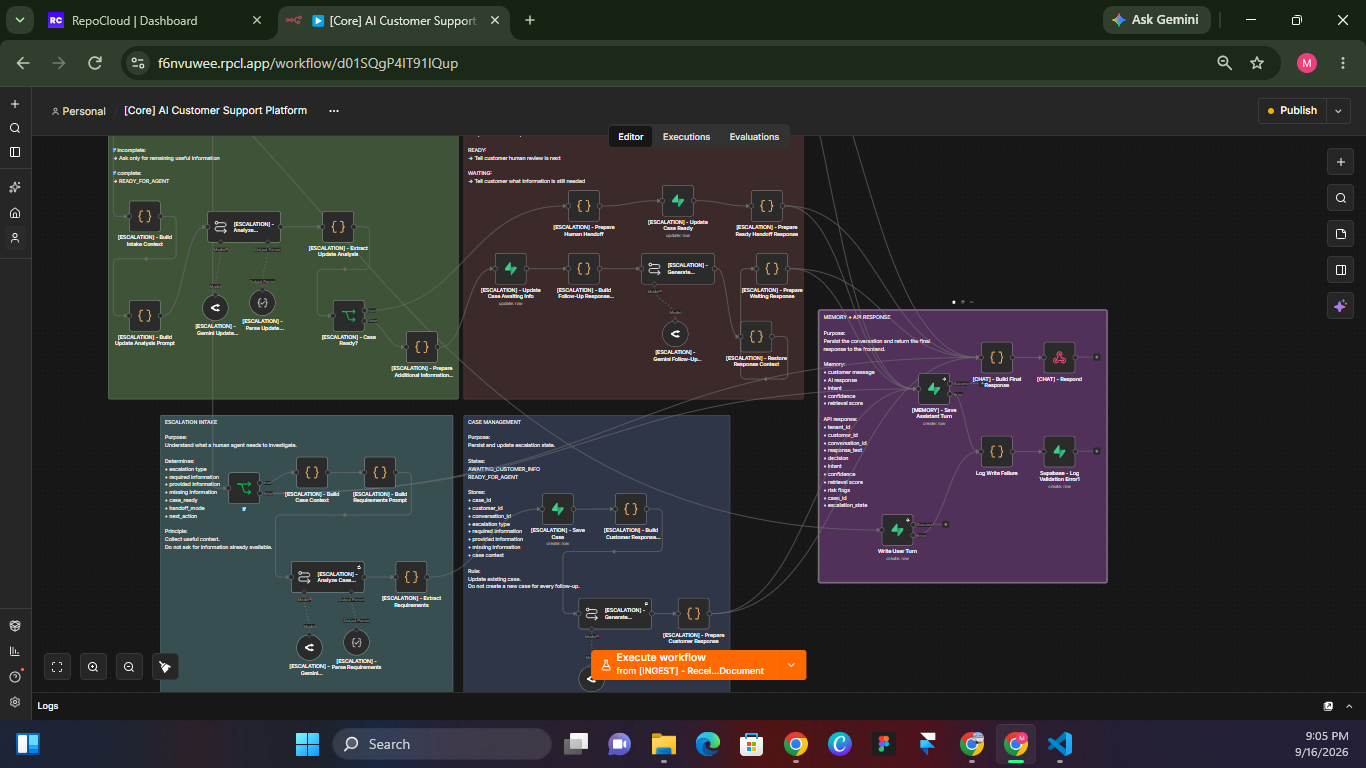
- —Handle multi-turn escalation state — merge new information with the original complaint, never ask the customer to repeat themselves.
- —Capture every failure mode (validation, extraction, DB write, unhandled) into a unified error log per tenant.
Approach
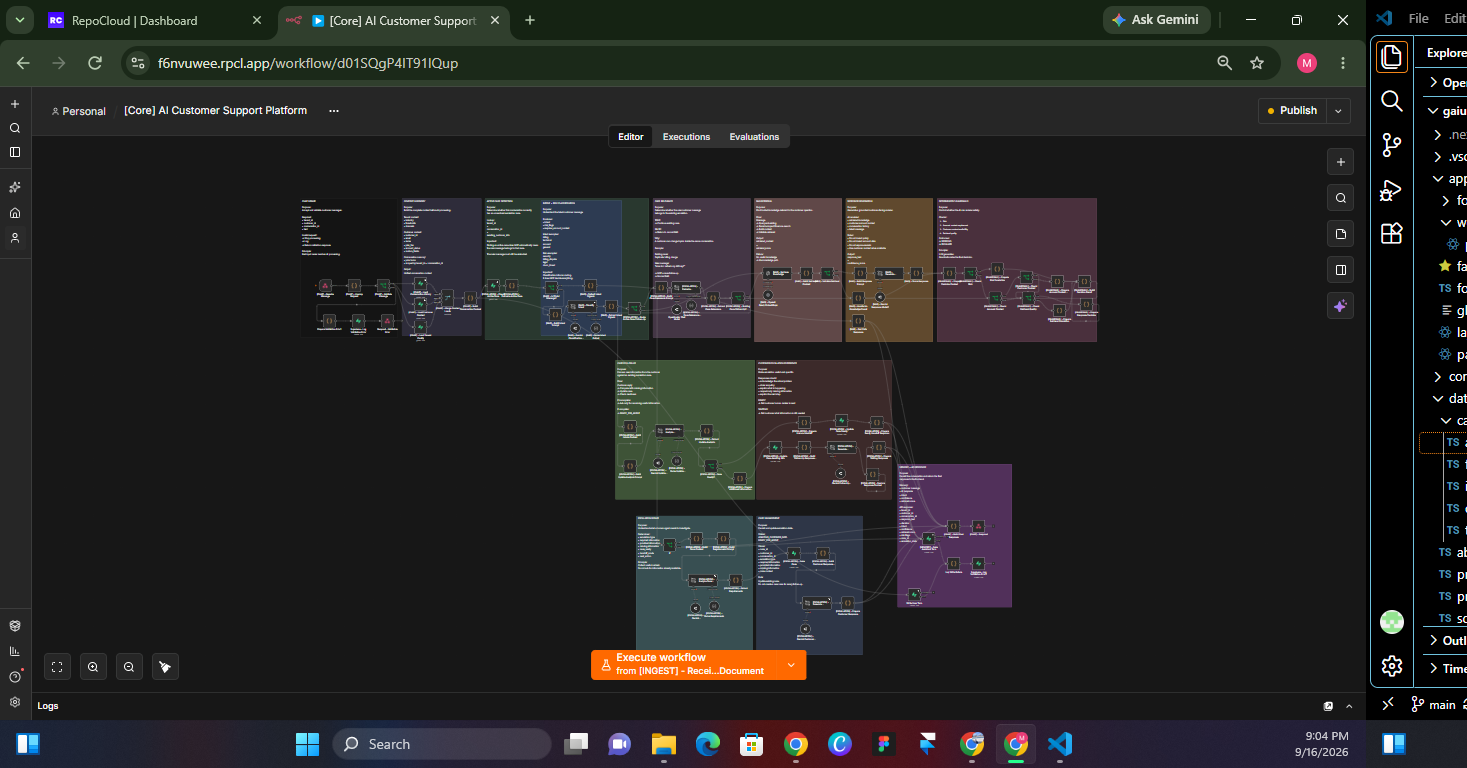
I built the system as a single orchestrated n8n workflow with section-prefixed node names ([CHAT], [RAG], [GUARDRAIL], [ESCALATION], [INGEST], [MEMORY], [ERROR]) plus a separate error-handling workflow. The LLM generates candidate text; deterministic guardrails decide whether that text is delivered or escalated. Two additional pipelines run independently: a knowledge ingestion pipeline (PDF / MD / DOCX / TXT / CSV → chunked → embedded → tenant-scoped vectors) and an isolated error workflow that catches unhandled failures and tags them with the originating tenant ID. The frontend is a React admin console plus an embedded chat widget — both deployed on Vercel.
The Manual Process Before
Every Tier-1 support ticket went through the same manual triage cycle, and most of them ended up escalated anyway.
- 01Tier-1 support ticket arrives in the queue
- 02Agent reads the message and manually searches the knowledge base
- 03Agent drafts an answer, or forwards to Tier-2 if uncertain
- 04Agent logs the interaction in a spreadsheet or CRM
- 05If unresolved, agent creates a follow-up task and waits for the customer to provide more information
What Was Built
Three independent workflows, each with a clear job. The main workflow handles the live customer conversation; the ingestion pipeline handles documents; the error workflow handles everything that goes wrong in either.
Core Live Chat Pipeline
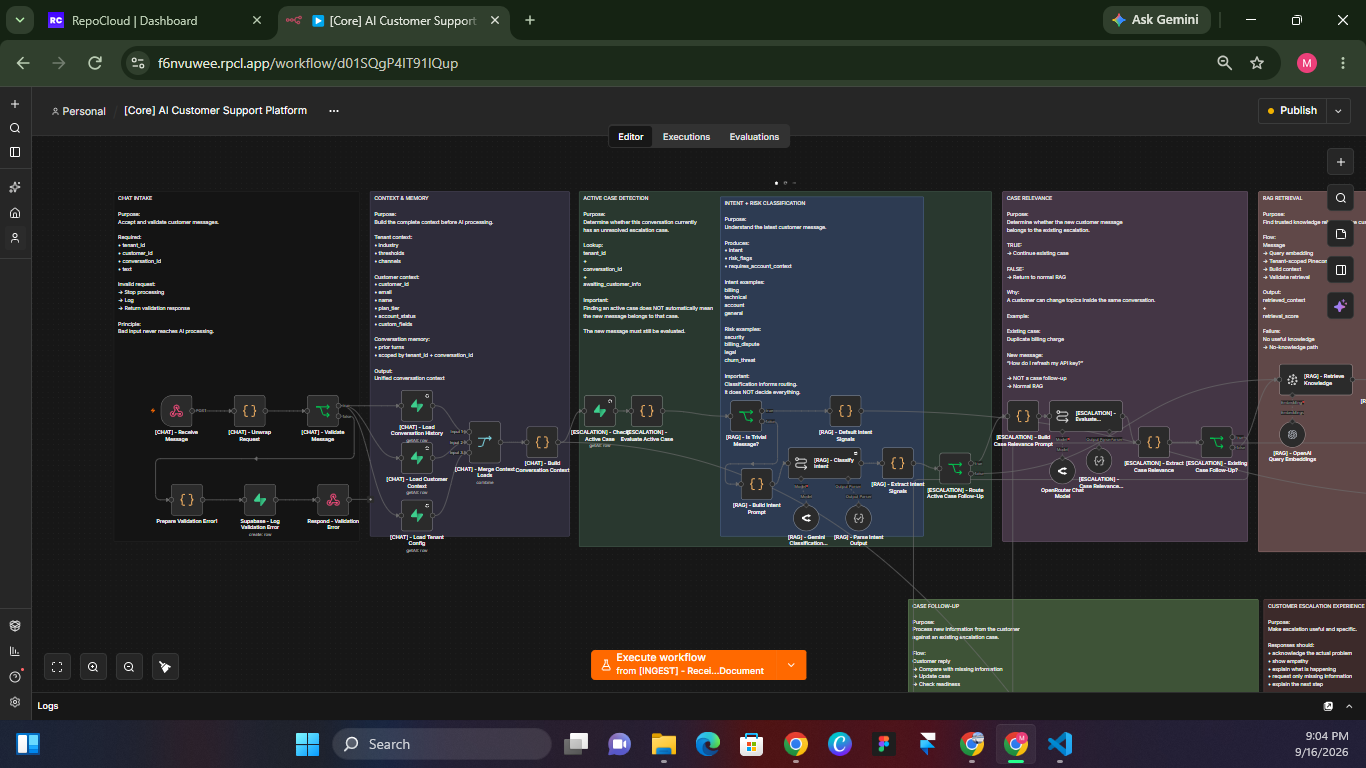
Every message flows through the same fixed pipeline: intake → context assembly → intent classification → RAG retrieval → grounded generation → deterministic guardrails → response or escalation. Node names are section-prefixed so the entire flow reads as a document — [CHAT], [RAG], [GUARDRAIL], [ESCALATION], [MEMORY], [ERROR] — not a wall of unlabeled boxes.
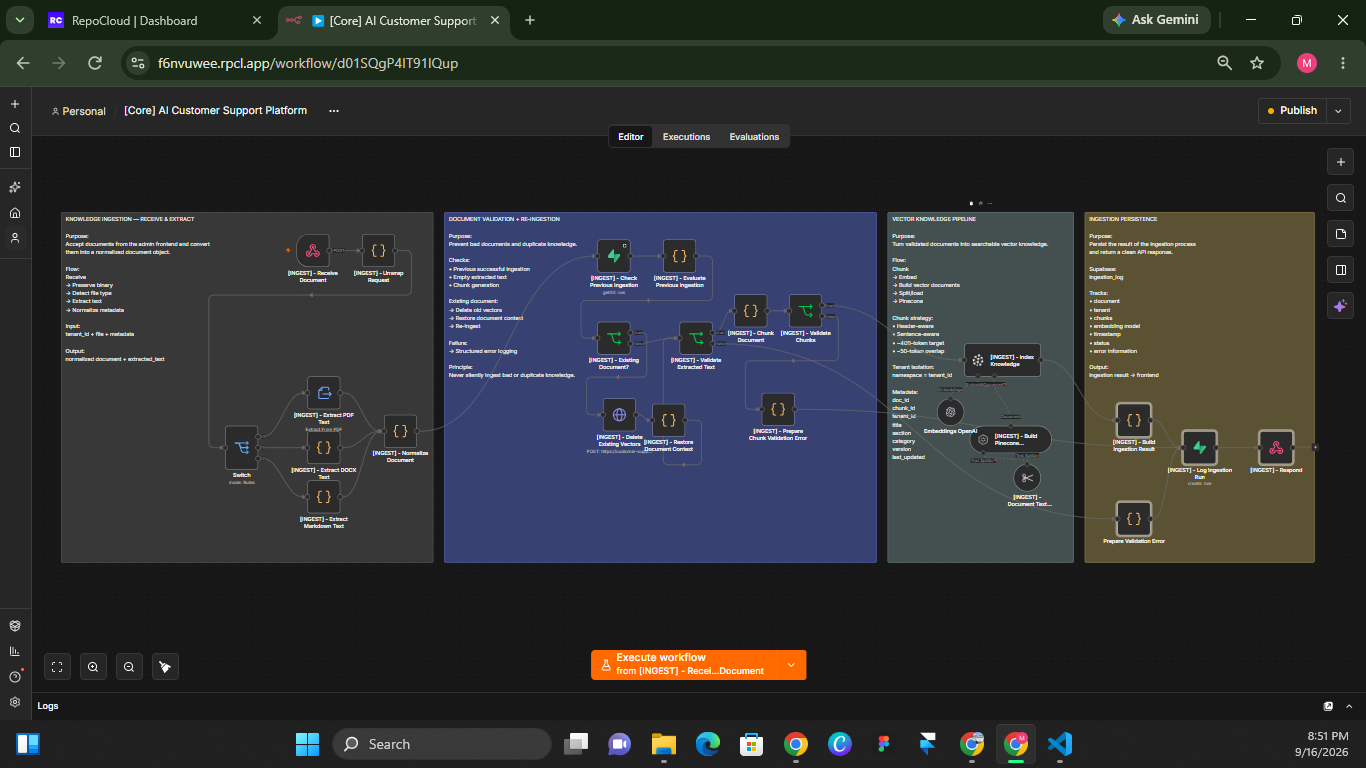
Knowledge Ingestion Pipeline
Accepts multipart uploads across 5 formats, routes by extension, extracts and validates text, chunks header-aware (Markdown splits on ##, PDF/DOCX fall back to structural heuristics), embeds with OpenAI text-embedding-3-large, and writes to tenant-scoped vectors in Pinecone. Re-ingestion deletes prior vectors for the same document first — no ghost chunks.
Independent Error Observability
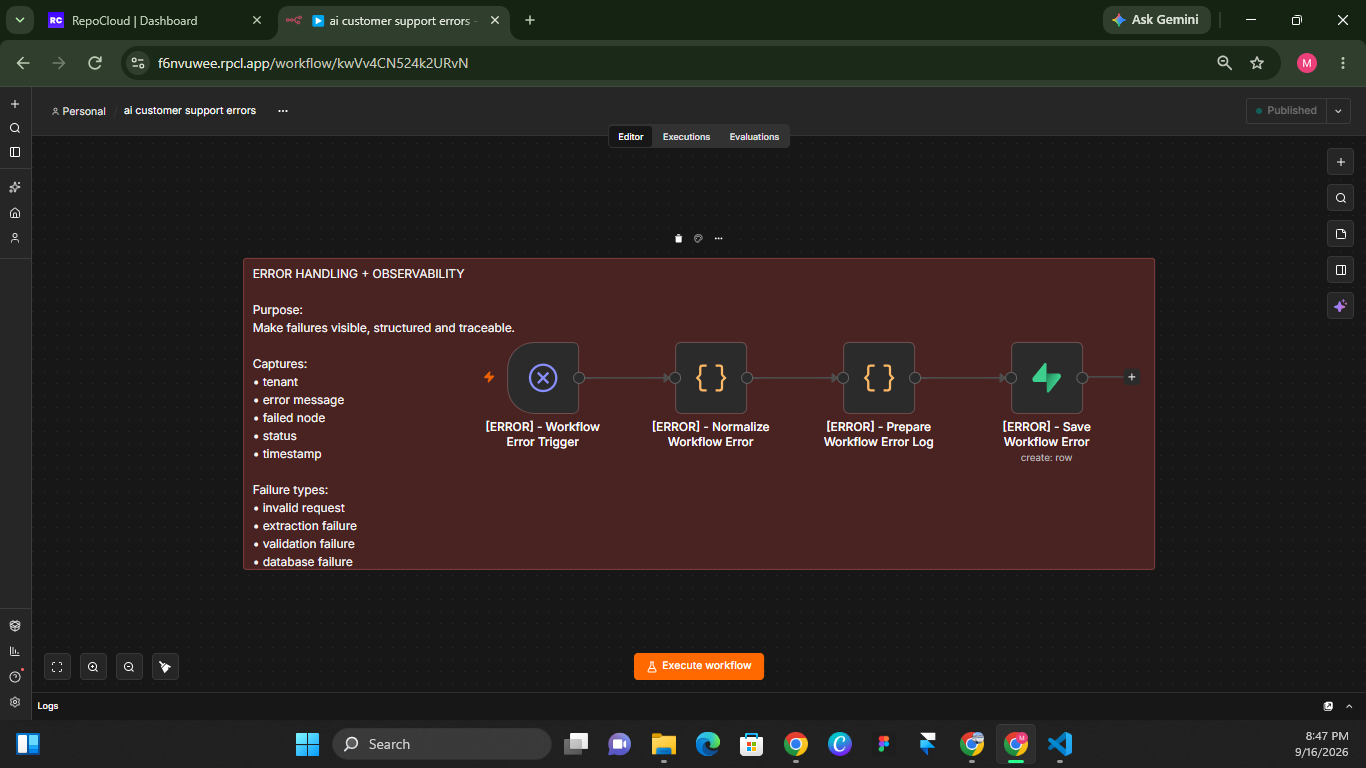
The error handler lives in a separate n8n workflow, isolated by workflow ID. The main workflow can't catch its own unhandled failures, and mixing the two muddles node names. Isolation also means the error handler is testable on its own and won't accidentally fire for unrelated workflows on the same n8n instance.
Design — An Ops Console Built Like a Health Monitor
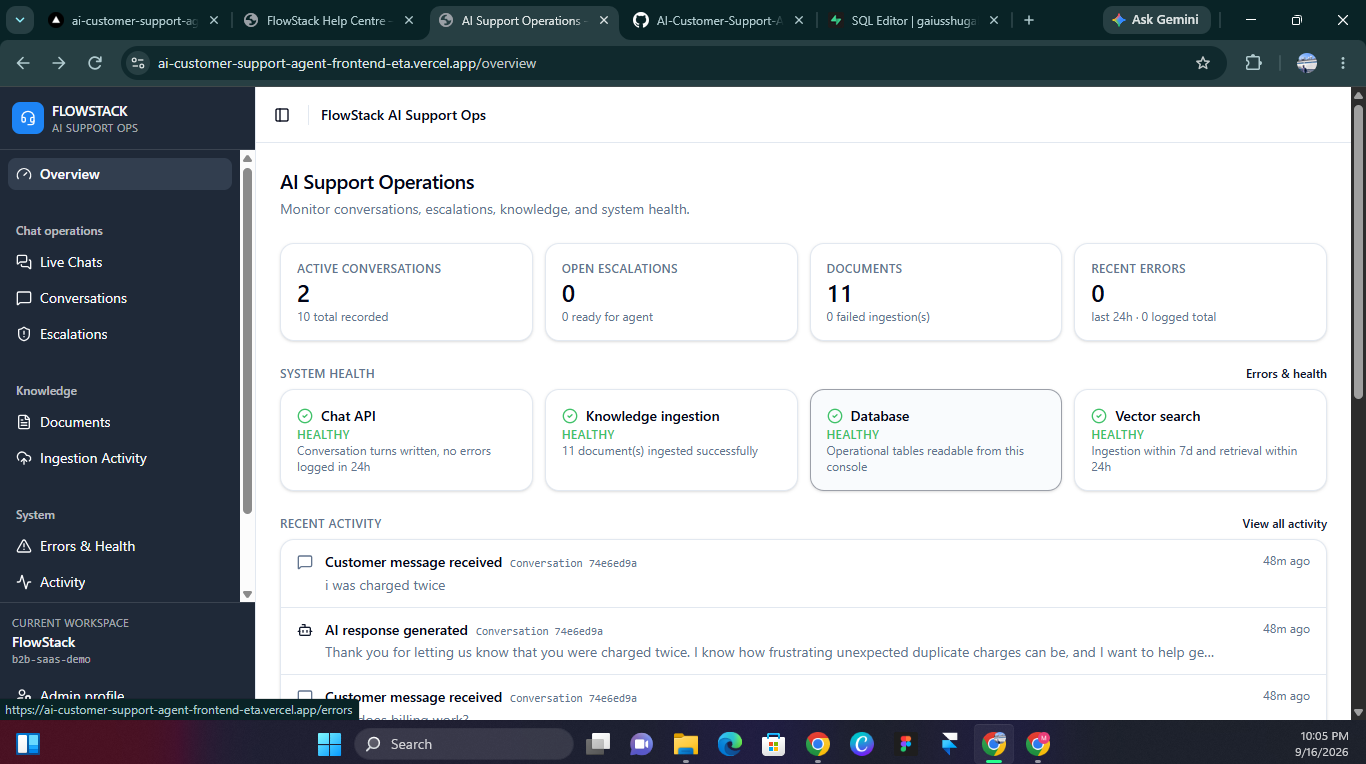
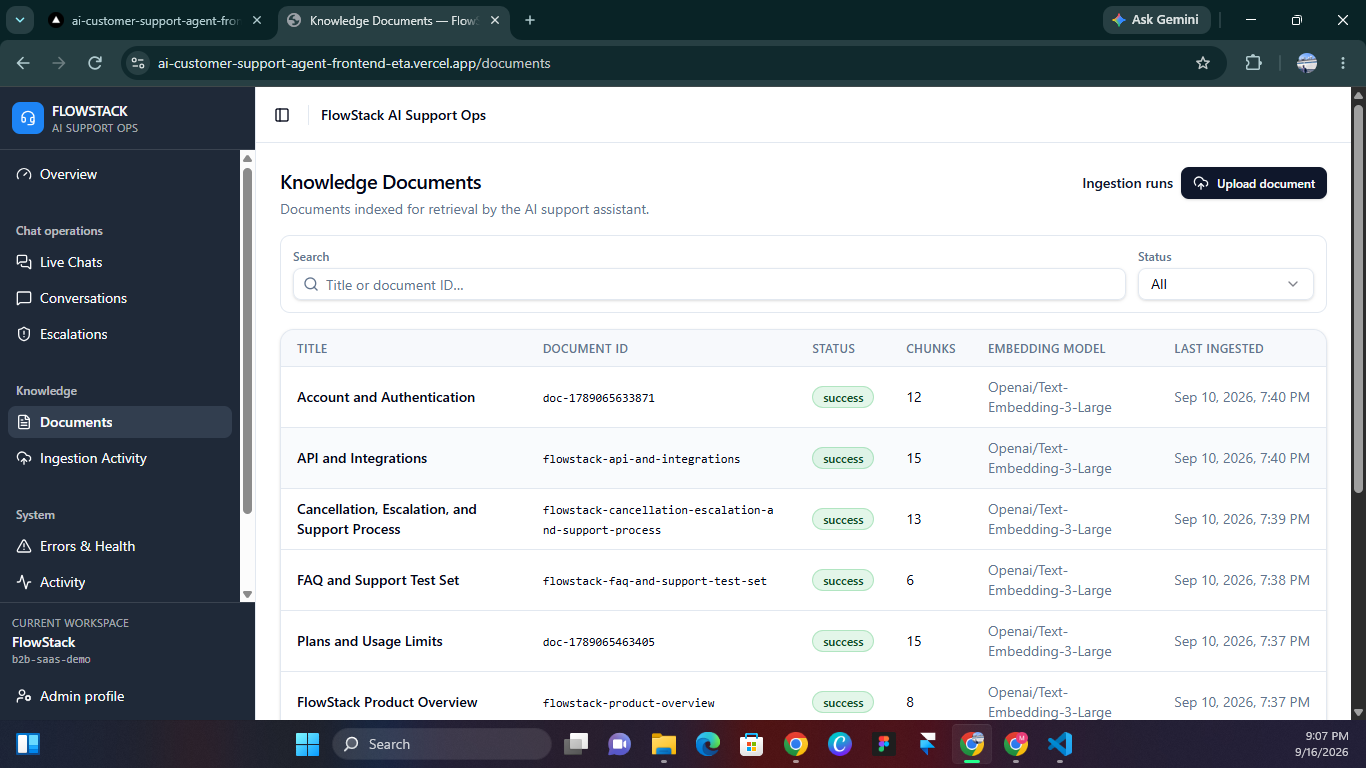
The admin console is a single-screen health monitor, not a data-heavy dashboard. Every panel answers one of four questions at a glance: Is ingestion healthy? Is the AI answering well? Are there errors? Are cases moving through the pipeline? Deliberately avoided pagination, filters, and complex queries — because an ops console that requires navigation is an ops console nobody opens.
- —Health indicators are derived from real system activity, not health-check pings. The Vector search card turns green when writes and reads have both happened recently — proving the round-trip actually completed, not just that the API responded to a probe.
- —The customer-facing chat widget shows a compact trace strip per message (Intent → Retrieval score → Decision) so support engineers can see why an answer was given, not just what it was.
- —Transparency over polish: engineer-facing signals inside a customer-facing surface, because in a support system, visible confidence is worth more than hidden machinery.
Architecture
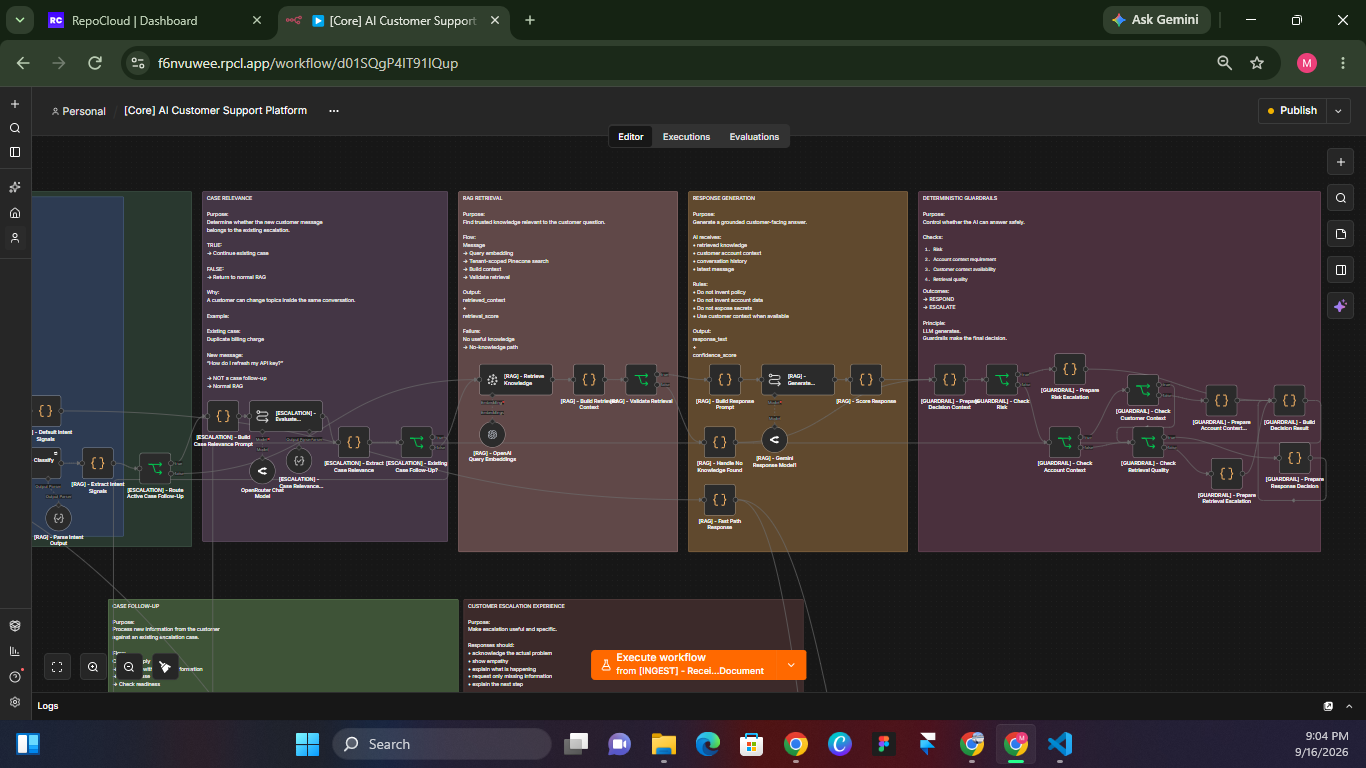
Six modules across three workflows. The main pipeline is fully deterministic: every message goes through the same path, and only plain JavaScript — never the model — decides whether to respond or escalate. The close-ups below show how each section is built.
Key Decisions
Deterministic guardrails over an autonomous agent
An LLM agent that 'decides' whether to escalate is unpredictable and impossible to debug at the node level. The current system routes every message through the same fixed pipeline; only plain JavaScript logic — not the model — decides whether to respond or escalate. Every routing decision traces back to a specific guardrail check.
Confidence as a computed heuristic, not LLM self-report
If you ask a model to grade its own answer, it will grade generously. Confidence here is derived deterministically from the retrieval score, the presence of risk flags, and whether the generated text contains hedging or refusal language. The model that writes the answer never sees the score it will be graded on.
Two workflows, not one
The error handler lives in a separate n8n workflow, isolated by workflow ID. The main workflow can't catch its own unhandled failures, and mixing the two muddles node names. Isolation also means the error handler is testable independently and won't accidentally fire for unrelated workflows on the same n8n instance.
Error Handling
Every failure path — validation, extraction, DB write, unhandled — lands in the same request_errors table with tenant_id, failed_node, error_message, and occurred_at. One query answers 'what's broken' without scrolling logs.
- —Document contains no extractable text — validation gate after extraction; logs to request_errors with failed_node: Validate Extracted Text. Case is not created, no vectors are written.
- —Embedding provider returns empty vector — Pinecone rejects with a dimension-mismatch error. Retry-on-fail is enabled on the embedding node with exponential backoff; the error propagates to the error workflow if retries are exhausted.
- —Supabase write failure on conversation turn — onError: continueErrorOutput routes to an inline Log Write Failure node that captures the error with tenant_id and failing node, then writes to request_errors without halting the workflow.
- —Unhandled workflow-level error — a separate error workflow normalizes the failure into the same schema as inline errors and writes to request_errors, ensuring one table is the single source of truth for all failures.
Customer Chat in Action
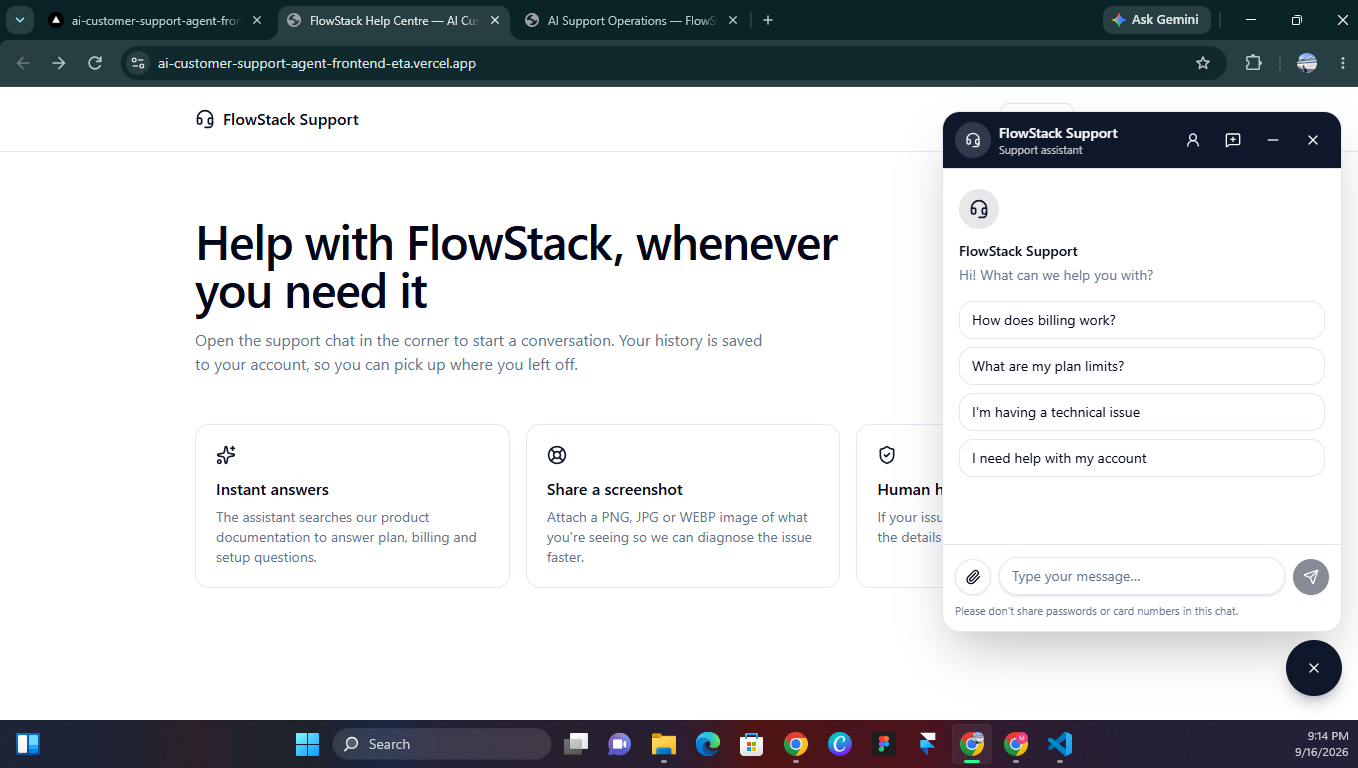
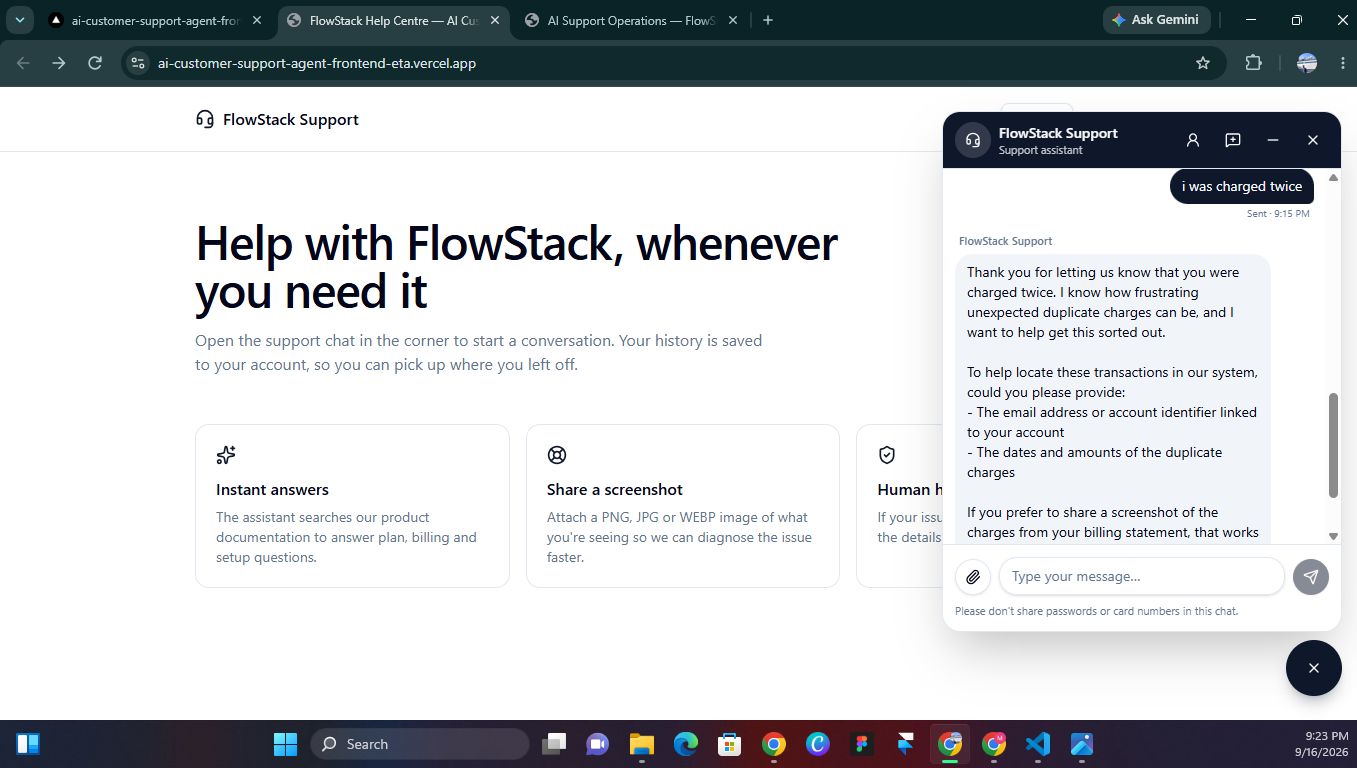
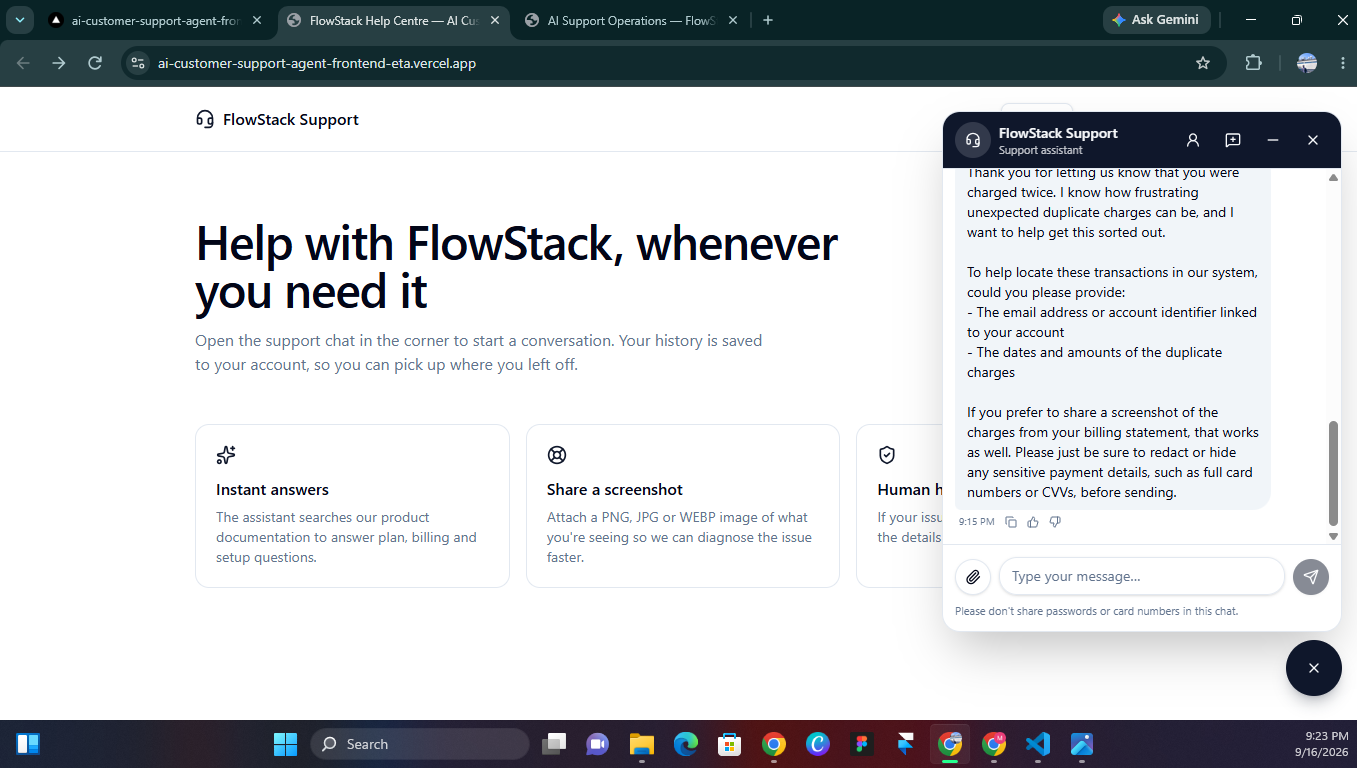
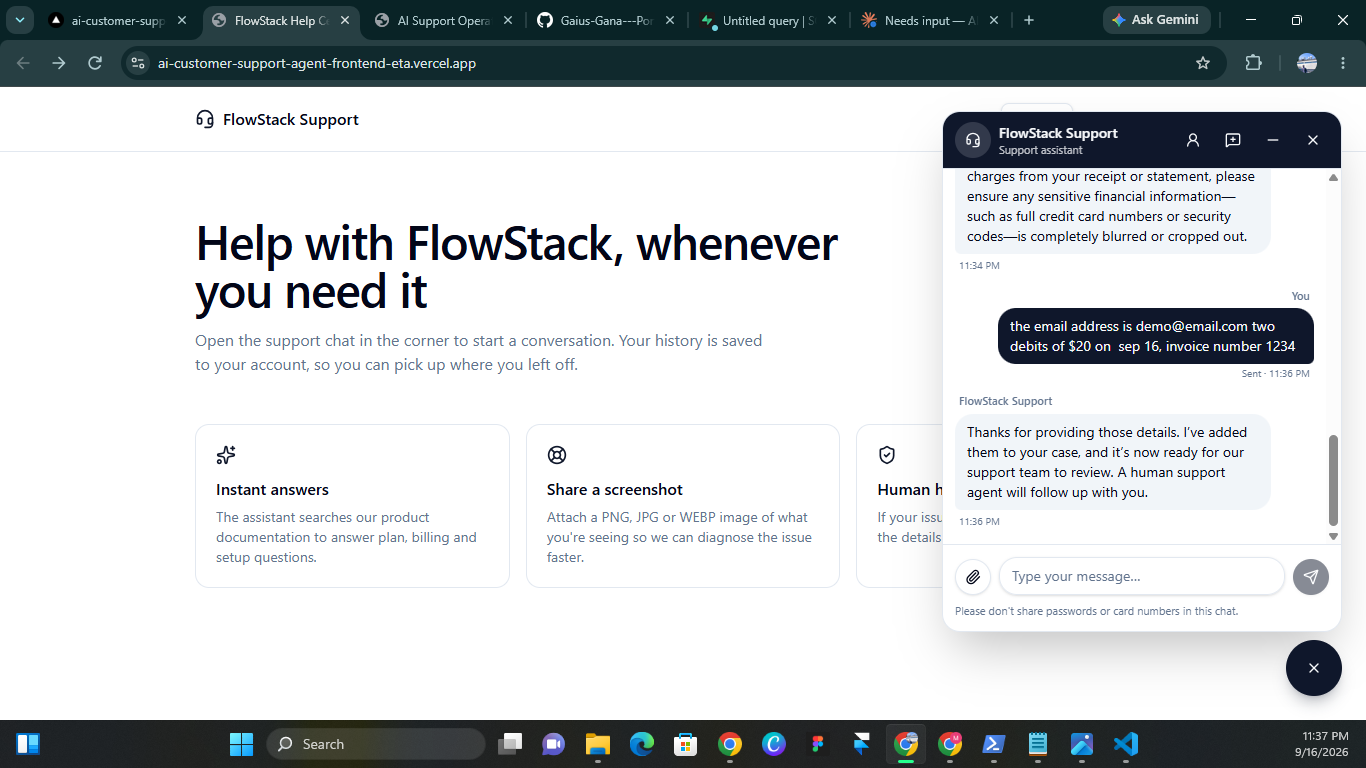
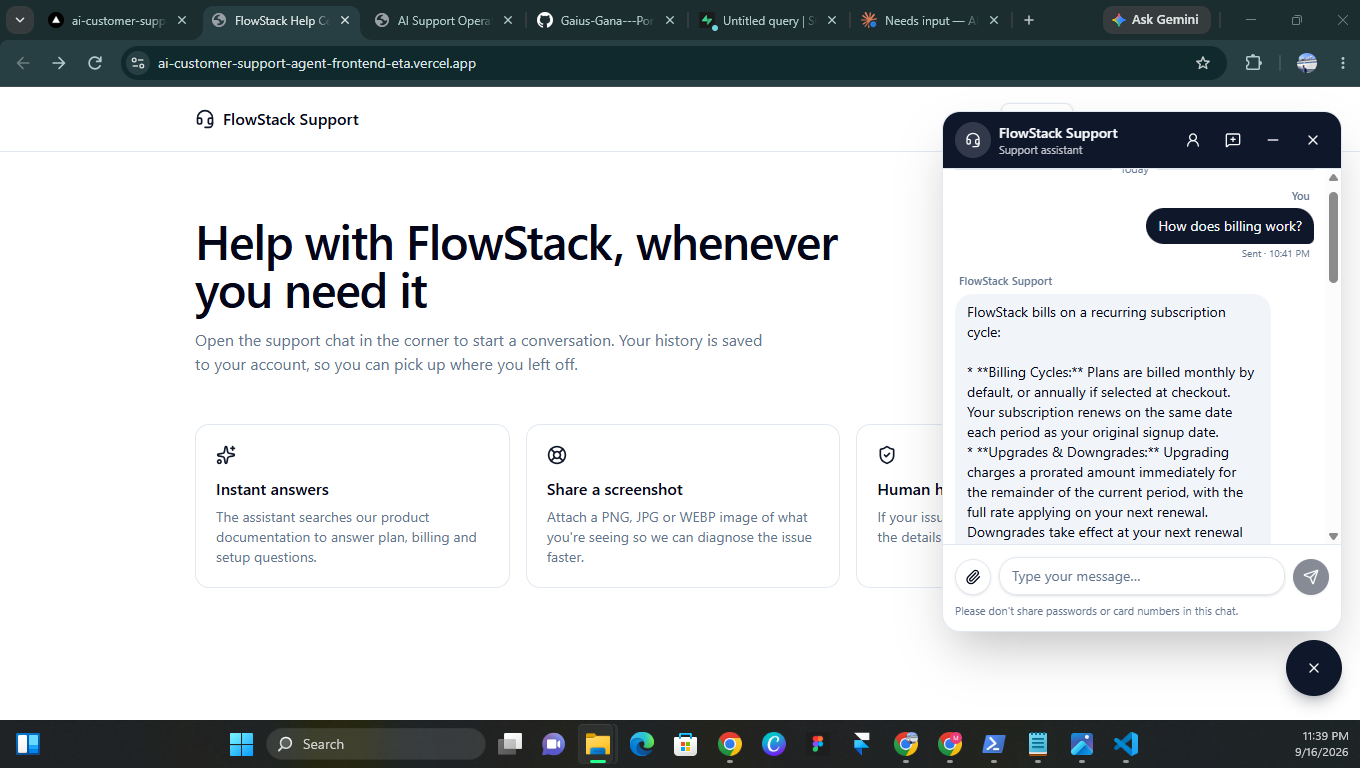
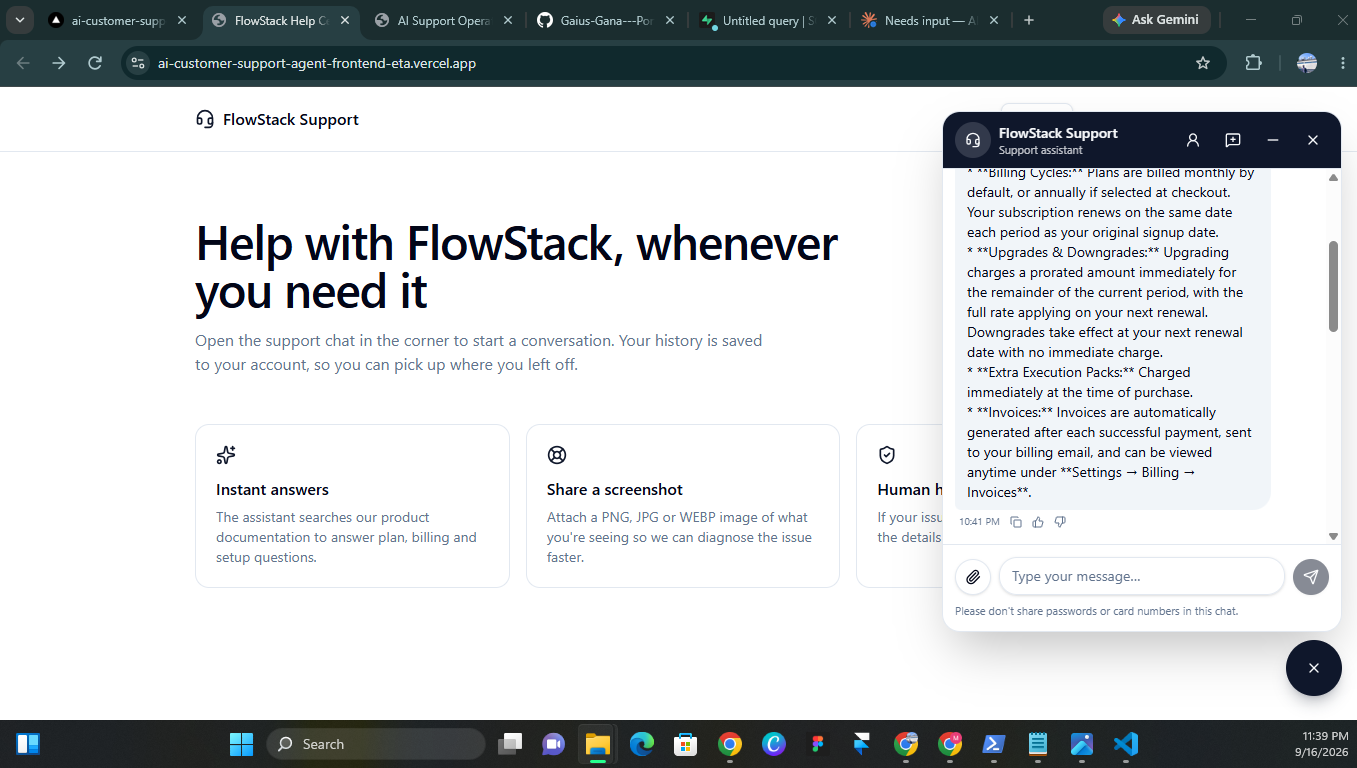
The customer-facing widget shows the full arc: initial greeting with suggested questions, a specific complaint, deterministic escalation asking for the details needed, multi-turn intake collecting those details without re-asking, and a final grounded answer when the question can safely be resolved by the knowledge base.
Results
Honest framing: this is a portfolio demo, not a production system with measured baseline data. Here's what I can verify from the live build. The gap I'm aware of: I haven't benchmarked against a Tier-1 human baseline on the same ticket set. That's the next measurement I'd add, along with conversation volume analytics.
Outcome
A production-shaped AI support platform — live at the demo URL above — that answers strictly from tenant documentation, escalates deterministically when it shouldn't answer, and captures every failure in a single observable table. The frontend is intentionally engineer-facing: an ops console that surfaces system health from real activity, and a chat widget that shows customers and engineers alike why each answer was given. The lesson the project kept reinforcing: in an AI system, what you don't automate matters as much as what you do.
What I'd Improve Next
Human agent operations layer — the system hands off to a human with full context, but there's no agent-side queue, assignment, notes, or SLA tracking. That's the natural next layer.
Streaming responses — currently the frontend waits for the full response before showing anything. Streaming would cut perceived latency by 2–3x for long answers.
Prompt library as data, not code — prompt text currently lives in n8n Code nodes. Moving it to a Prompt_Library table would enable per-tenant prompt overrides and version history without redeploying the workflow.